Posts

Scilab 2025.0.0 Install File

 https://www.scilab.org/download/scilab-2025.0.0 Released on Thu, 24 Oct 2024 System requirements  |  Change log Scilab 2025.0.0 is released under the terms of the  GNU General Public License (GPL) v2.0 . Windows 8, 10, 11 Scilab 2025.0.0 - Windows 64 bits (exe) This version has been compiled by Dassault Systèmes and other builds are available on  Gitlab . GNU/Linux Scilab 2025.0.0 - Linux 64 bits (tar.xz) This version has been compiled by Dassault Systèmes and other builds are available on  Gitlab . macOS Scilab 2025.0.0 - macOS 64 bits (Intel) (dmg) Scilab 2025.0.0 - macOS 64 bits (ARM) (dmg) This version has been compiled by University of Technology of Compiègne (UTC) and other builds are available on  UTC website .  

9. Calculate the thermal noise or white noise, Noise Power, and Noise Voltage.

Image
  Calculate the thermal noise or white noise, Noise Power, and Noise Voltage. // Calculate the thermal noise or white noise, Noise Power, and Noise Voltage. K= 1.38 * 10 ^- 23 ; // Boltzmann's constant B= 10000 ; // absolute temperature T= 290 ; // bandwidth // Thermal or white noise. N=K*B*T; disp ( "Noise =" ); disp (N); // Noise Power Ndb=- 174 + 10 * log10 (B); disp ( "Noise Power =" ); disp (Ndb); // Noise Voltage of a Noisy resistor. Vn=sqrt(4*R*N); // where, R=100. You can change the value of R. Vn= sqrt ( 4 * 100 *N); disp ( "Noise Voltage =" ); disp (Vn); // Output Calculate the thermal noise or white noise, Noise Power, and Noise Voltage.

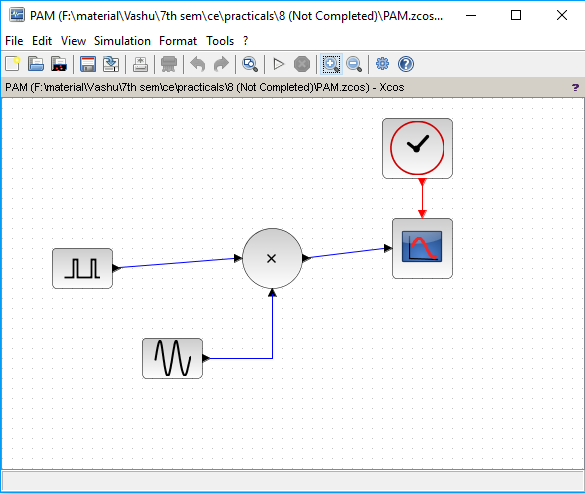
8. Generate PAM using Scilab Xcos

Image
  Generate PAM using Scilab Xcos // PAM using Scilab Xcos. PAM using Scilab Xcos. // Output PAM using Scilab Xcos.

7. Create a sin wave and analyze the effect of adding noise to it.

Image
  Create a sin wave and analyze the effect of adding noise to it. // Create a sin wave and analyze the effect of adding noise to it. subplot( 3 , 1 , 1 ); noisegen (. 5 , 30 , 1 ); x=- 5 :. 01 : 35 ; y= feval (x,Noise); plot(x,y); subplot( 3 , 1 , 2 ); //simple plot B= 5 * sin (x); plot(B); subplot( 3 , 1 , 3 ); C=y.*B; plot(C); // Output Create a sin wave and analyze the effect of adding noise to it.

6. Simulate BPSK or PSK technique Using Scilab

Image
  Simulate BPSK or PSK technique Using Scilab // BPSK or PSK --> Binary Phase Shift Keying t=[ 0 : 0.01 : 5 * %pi ]; A= 5 ; wc= 2 ; Vm=A.* squarewave (t); Vc=A.* sin (wc.*t); Vp= Vm.*Vc; subplot( 3 , 1 , 1 ); plot(t,Vm, 'black' ); subplot( 3 , 1 , 2 ); plot(t,Vc, 'black' ); subplot( 3 , 1 , 3 ); plot(t,Vp, 'black' ); // Output BPSK or PSK --> Binary Phase Shift Keying

5. Simulate BFSK or FSK technique.

Image
  Simulate BFSK or FSK technique. // BFSK or FSK --> Binary Frequency Shift Keying. t=[ 0 : 0.01 : 4.4 * %pi ]; A= 5 ; wc= 5 ; Vm=A.* squarewave (t); Vc=A.* cos (wc.*t); fc=wc/( 2 * %pi ); subplot( 5 , 1 , 1 ); plot(t,Vm, 'black' ); subplot( 5 , 1 , 2 ); plot(t,Vc, 'black' ); df= 0.5 ; subplot( 5 , 1 , 3 ); Vf=A.* cos ( 2. * %pi .*(fc+Vm.*df).*t); plot(t,Vf, 'black' ); legend( 'df=0.5' ); df= 1 ; subplot( 5 , 1 , 4 ); Vf=A.* cos ( 2. * %pi .*(fc+Vm.*df).*t); plot(t,Vf, 'black' ); legend( 'df=1' ); df= 1.5 subplot( 5 , 1 , 5 ); Vf=A.* cos ( 2. * %pi .*(fc+Vm.*df).*t); plot(t,Vf, 'black' ); legend( 'df=1.5' ); // Output BFSK or FSK --> Binary Frequency Shift Keying

4. Simulate BASK or ASK technique using Scilab.

Image
  Simulate BASK or ASK technique using Scilab. // BASK or ASK --> Binary Amplitude Shift Keying t=[ 0 : 0.02 : 5 * %pi ]; wc= 7 ; A= 0.5 ; Vm= squarewave (t, 30 ); // The second parameter in the squarewave function is the percent of the period in which the // signal is positive. Vc=A/ 2. * cos (wc.*t); Va=( 1 +Vm).*(Vc); subplot( 3 , 1 , 1 ); plot(t,Vm, 'black' ); subplot( 3 , 1 , 2 ); plot(t,Vc, 'black' ); subplot( 3 , 1 , 3 ); plot(t,Va, 'black' ); // Output BASK or ASK --> Binary Amplitude Shift Keying