Posts

Showing posts from February, 2025

Scilab 2025.0.0 Install File

 https://www.scilab.org/download/scilab-2025.0.0 Released on Thu, 24 Oct 2024 System requirements  |  Change log Scilab 2025.0.0 is released under the terms of the  GNU General Public License (GPL) v2.0 . Windows 8, 10, 11 Scilab 2025.0.0 - Windows 64 bits (exe) This version has been compiled by Dassault Systèmes and other builds are available on  Gitlab . GNU/Linux Scilab 2025.0.0 - Linux 64 bits (tar.xz) This version has been compiled by Dassault Systèmes and other builds are available on  Gitlab . macOS Scilab 2025.0.0 - macOS 64 bits (Intel) (dmg) Scilab 2025.0.0 - macOS 64 bits (ARM) (dmg) This version has been compiled by University of Technology of Compiègne (UTC) and other builds are available on  UTC website .  

9. Calculate the thermal noise or white noise, Noise Power, and Noise Voltage.

Image
  Calculate the thermal noise or white noise, Noise Power, and Noise Voltage. // Calculate the thermal noise or white noise, Noise Power, and Noise Voltage. K= 1.38 * 10 ^- 23 ; // Boltzmann's constant B= 10000 ; // absolute temperature T= 290 ; // bandwidth // Thermal or white noise. N=K*B*T; disp ( "Noise =" ); disp (N); // Noise Power Ndb=- 174 + 10 * log10 (B); disp ( "Noise Power =" ); disp (Ndb); // Noise Voltage of a Noisy resistor. Vn=sqrt(4*R*N); // where, R=100. You can change the value of R. Vn= sqrt ( 4 * 100 *N); disp ( "Noise Voltage =" ); disp (Vn); // Output Calculate the thermal noise or white noise, Noise Power, and Noise Voltage.

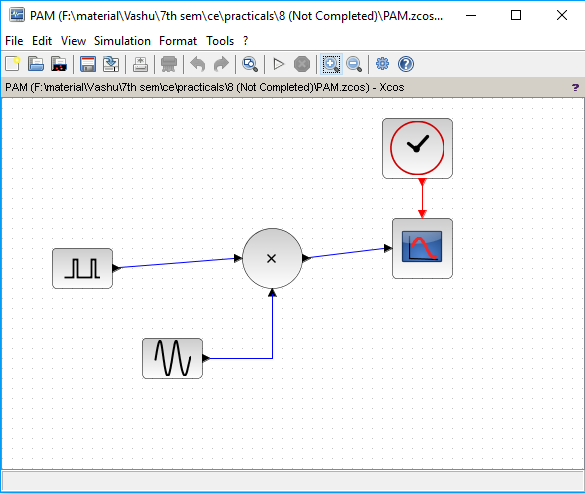
8. Generate PAM using Scilab Xcos

Image
  Generate PAM using Scilab Xcos // PAM using Scilab Xcos. PAM using Scilab Xcos. // Output PAM using Scilab Xcos.

7. Create a sin wave and analyze the effect of adding noise to it.

Image
  Create a sin wave and analyze the effect of adding noise to it. // Create a sin wave and analyze the effect of adding noise to it. subplot( 3 , 1 , 1 ); noisegen (. 5 , 30 , 1 ); x=- 5 :. 01 : 35 ; y= feval (x,Noise); plot(x,y); subplot( 3 , 1 , 2 ); //simple plot B= 5 * sin (x); plot(B); subplot( 3 , 1 , 3 ); C=y.*B; plot(C); // Output Create a sin wave and analyze the effect of adding noise to it.

6. Simulate BPSK or PSK technique Using Scilab

Image
  Simulate BPSK or PSK technique Using Scilab // BPSK or PSK --> Binary Phase Shift Keying t=[ 0 : 0.01 : 5 * %pi ]; A= 5 ; wc= 2 ; Vm=A.* squarewave (t); Vc=A.* sin (wc.*t); Vp= Vm.*Vc; subplot( 3 , 1 , 1 ); plot(t,Vm, 'black' ); subplot( 3 , 1 , 2 ); plot(t,Vc, 'black' ); subplot( 3 , 1 , 3 ); plot(t,Vp, 'black' ); // Output BPSK or PSK --> Binary Phase Shift Keying

5. Simulate BFSK or FSK technique.

Image
  Simulate BFSK or FSK technique. // BFSK or FSK --> Binary Frequency Shift Keying. t=[ 0 : 0.01 : 4.4 * %pi ]; A= 5 ; wc= 5 ; Vm=A.* squarewave (t); Vc=A.* cos (wc.*t); fc=wc/( 2 * %pi ); subplot( 5 , 1 , 1 ); plot(t,Vm, 'black' ); subplot( 5 , 1 , 2 ); plot(t,Vc, 'black' ); df= 0.5 ; subplot( 5 , 1 , 3 ); Vf=A.* cos ( 2. * %pi .*(fc+Vm.*df).*t); plot(t,Vf, 'black' ); legend( 'df=0.5' ); df= 1 ; subplot( 5 , 1 , 4 ); Vf=A.* cos ( 2. * %pi .*(fc+Vm.*df).*t); plot(t,Vf, 'black' ); legend( 'df=1' ); df= 1.5 subplot( 5 , 1 , 5 ); Vf=A.* cos ( 2. * %pi .*(fc+Vm.*df).*t); plot(t,Vf, 'black' ); legend( 'df=1.5' ); // Output BFSK or FSK --> Binary Frequency Shift Keying

4. Simulate BASK or ASK technique using Scilab.

Image
  Simulate BASK or ASK technique using Scilab. // BASK or ASK --> Binary Amplitude Shift Keying t=[ 0 : 0.02 : 5 * %pi ]; wc= 7 ; A= 0.5 ; Vm= squarewave (t, 30 ); // The second parameter in the squarewave function is the percent of the period in which the // signal is positive. Vc=A/ 2. * cos (wc.*t); Va=( 1 +Vm).*(Vc); subplot( 3 , 1 , 1 ); plot(t,Vm, 'black' ); subplot( 3 , 1 , 2 ); plot(t,Vc, 'black' ); subplot( 3 , 1 , 3 ); plot(t,Va, 'black' ); // Output BASK or ASK --> Binary Amplitude Shift Keying

3. Program to generate FM Signal and Analyze the effect of increasing modulation index for each modulation technique.

Image
  Program to generate FM Signal and Analyze the effect of increasing modulation index for each modulation technique. // FM --> Frequency Modulation Ac= 10 ; Am= 10 ; wm= 2 * %pi * 25 ; wc= 2 * %pi * 400 ; t=[ 1 : 0.0002 : 1.1 ]; m=Am* cos (wm*t); c=Ac* cos (wc*t); subplot( 5 , 1 , 1 ); mf= 10 ; Sam1=Ac* cos (wc.*t+(mf)* sin (wm.*t)); plot(t,Sam1, 'red' ); legend( 'm=10' ); mf= 12 ; subplot( 5 , 1 , 2 ); Sam=Ac* cos (wc.*t+mf* sin (wm.*t)); plot(t,Sam , 'blue' ); legend( 'm=12' ); xlabel( 'Time' ); ylabel( 'Amplitude' ); subplot( 5 , 1 , 3 ); mf= 15 ; Sam=Ac* cos (wc.*t+(mf)* sin (wm.*t)); plot(t,Sam, 'black' ); legend( 'm=15' ); subplot( 5 , 1 , 4 ); mf= 20 ; Sam=Ac* cos (wc.*t+(mf+ 20 )* sin (wm.*t)); plot(t,Sam, 'green' ); legend( 'm=20' ); subplot( 5 , 1 , 5 ); mf= 15 ; Sam1=Ac* cos (wc.*t+(mf)* sin (wm.*t)); plot(t,m, 'black' ,t,c, 'green' ,t,Sam1, 'blue' ); legend(...

2. Program to generate PM Signal and analyze the effect of increasing modulation index for each modulation technique.

Image
  Program to generate PM Signal and analyze the effect of increasing modulation index for each modulation technique. // PM --> Phase Modulation Ac= 10 ; Am= 1 ; wm= 2 * %pi * 25 ; wc= 2 * %pi * 400 ; t=[ 1 : 0.0002 : 1.1 ]; m=Am* cos (wm*t); c=Ac* cos (wc*t); subplot( 5 , 1 , 1 ); mf= 60 ; Sam1=Ac* cos (wc.*t+(mf)* sin (wm.*t)); plot(t,Sam1, 'red' ); legend( 'm=60' ); mf= 80 ; subplot( 5 , 1 , 2 ); Sam=Ac* cos (wc.*t+mf* sin (wm.*t)); plot(t,Sam , 'blue' ); legend( 'm=80' ); xlabel( 'Time' ); ylabel( 'Amplitude' ); subplot( 5 , 1 , 3 ); mf= 90 ; Sam=Ac* cos (wc.*t+mf* sin (wm.*t)); plot(t,Sam, 'black' ); legend( 'm=90' ); subplot( 5 , 1 , 4 ); mf= 100 ; Sam=Ac* cos (wc.*t+mf* sin (wm.*t)); plot(t,Sam, 'green' ); legend( 'm=100' ); subplot( 5 , 1 , 5 ); mf= 150 ; Sam=Ac* cos (wc.*t+mf* sin (wm.*t)); plot(t,Sam, 'cyan' ); legend( 'm=150' ); // Output ...

Communication Engineering Programs using scilab

  Communication Engineering Programs using scilab Scilab Programs : Program to generate AM Signal and analyze the effect of increasing modulation index for each modulation technique. Program to generate PM Signal and analyze the effect of increasing modulation index for each modulation technique. Program to generate FM Signal and Analyze the effect of increasing modulation index for each modulation technique. Simulate BASK or ASK technique using Scilab. Simulate BFSK or FSK technique. Simulate BPSK or PSK technique Using Scilab. Create a sin wave and analyze the effect of adding noise to it. Generate PAM using Scilab xcos. Calculate the thermal noise or white noise, Noise Power, and Noise Voltage.